Never lose a punch again. On-premise. Offline-proof. Automatic.
SyncID connects your time clocks to SyncrOne and delivers every attendance record — even when your network doesn't cooperate. No cloud. No subscription. No data leaves your LAN.
99.9%
Records delivered
Every punch reaches SyncrOne — even after network outages
<200ms
Clock to dashboard
From badge tap to visible in your HR system
24/7
Runs itself
No babysitting — sync, retry, and recovery happen automatically
100%
On your LAN
Biometric data and attendance logs never leave your network
Features
Built to run when everything else fails
IT gets stability. HR gets accuracy. Management gets visibility — across every clock, every employee, every punch.
Works when your network doesn't
Your network drops — SyncID keeps working. Attendance logs buffer locally and sync the moment connectivity returns. Zero data loss, zero manual intervention.
Every punch, the instant it happens
Attendance events arrive the second they occur. Live event streaming or scheduled collection intervals — your choice.
One screen. Full picture.
Device health, employee counts, attendance trends, and system status — everything you need in a single view.
Face, finger, card, PIN — every method
Support every authentication method your devices offer — face recognition, fingerprint, RFID, and PIN — across your entire fleet.
See who clocks in, when, and where
Spot attendance patterns at a glance. Hourly distribution, per-device breakdown, and peak-hour detection give you data-driven workforce insights.
Control every device from your desk
Time sync, employee enrollment, storage checks, connection health — manage your entire device fleet from one interface without leaving your chair.
Know before your team complains
A device goes offline — you know immediately. Email and Microsoft Teams alerts for disconnections, health changes, and sync failures, configurable per channel.
Five health checks, zero surprises
Database, API, background jobs, device connectivity, and notification services — five checks run around the clock. Response time trends and real-time status keep you one step ahead.
How It Works
From punch to payroll in three steps
Employee punches in
An employee scans their face, taps their card, or places a finger on any connected device. The device records the identity, timestamp, and authentication method.
Supports face, fingerprint, RFID, and PIN — on any device in your fleet.
Marko Petrović
Face scan · Lobby Terminal · 08:01:23
SyncID captures the event
SyncID receives the attendance record instantly via live event streaming, or collects it on a schedule you set.
If the network is down, records are buffered locally. Nothing is ever lost.
Data flows to SyncrOne
Records are batched and forwarded to your central SyncrOne system with automatic retries. If a delivery fails, it's queued and retried until confirmed.
HR sees attendance data in real time. No manual exports, no CSV files, no delays.
Devices
SyncID
SyncrOne
Supported Devices
Works with the hardware you already have
ZKTeco devices out of the box — with an architecture designed to support any vendor.
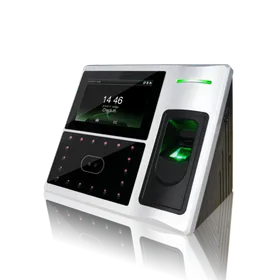
iFace 702
FlagshipZKTeco
Multi-biometric attendance terminal with infrared camera for face recognition, optical fingerprint sensor, and 4.3" TFT touch display. Built on the ZEM600 platform with 630 MHz processor.
- Face recognition (ZK Face 7.0)
- Fingerprint (ZK Finger 10.0)
- Password
- 4.3" TFT touch display
- Face capacity: 400 | FP capacity: 3,000
- TCP/IP, RS232/485
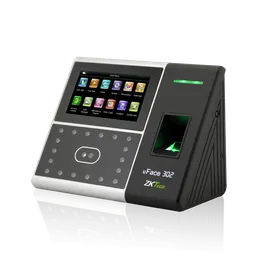
iFace 302
Multi-BiometricZKTeco
Multi-biometric attendance terminal with face, fingerprint, RFID, and password authentication. Features a 4.3" TFT touch display and 800 MHz processor for fast verification.
- Face recognition (ZK Face 7.0)
- Fingerprint
- RFID card (125 KHz)
- Password
- 4.3" TFT touch display
- Face capacity: 1,200 | FP capacity: 2,000
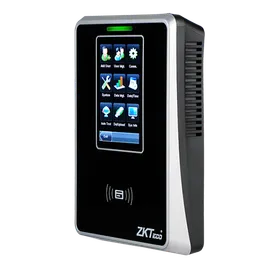
SC700
RFID TerminalZKTeco
125 KHz proximity access control terminal with 3" TFT LCD touchscreen. Simple and reliable card-based attendance for environments where biometrics aren't needed.
- RFID card (125 KHz EM)
- Card capacity: 30,000
- 3" TFT LCD touch display
- Record capacity: 100,000
- TCP/IP, Wiegand I/O
Don't see your device? SyncID's architecture supports SDK-level integration with virtually any attendance terminal. Expanding to new vendors is a matter of configuration, not rebuilding.
Why On-Premise
Your data, your network, your rules
Fingerprints and face templates live on your devices. Attendance logs travel your LAN. SyncID is on-premise because that's where biometric data belongs — and where it should stay.
On-Premise
Typical SaaS
FAQ
Frequently Asked Questions
What happens when the network goes down?
Which biometric methods does SyncID support?
Do I need a cloud subscription?
How does SyncID connect to SyncrOne?
Can I use devices from other manufacturers?
How many devices can SyncID manage?
Is employee biometric data sent over the internet?
How does SyncID alert me to problems?
See it live on your network in 30 minutes?
We'll walk you through a live deployment on your LAN. See your devices syncing, your dashboard updating, and your data staying exactly where it belongs — on your network.
Free walkthrough · No commitment · Deploys on your infrastructure